Microsoft 365 License Optimization Reports for MSPs

Win Clients with Data

The average Microsoft 365 customer is overpaying by 22%
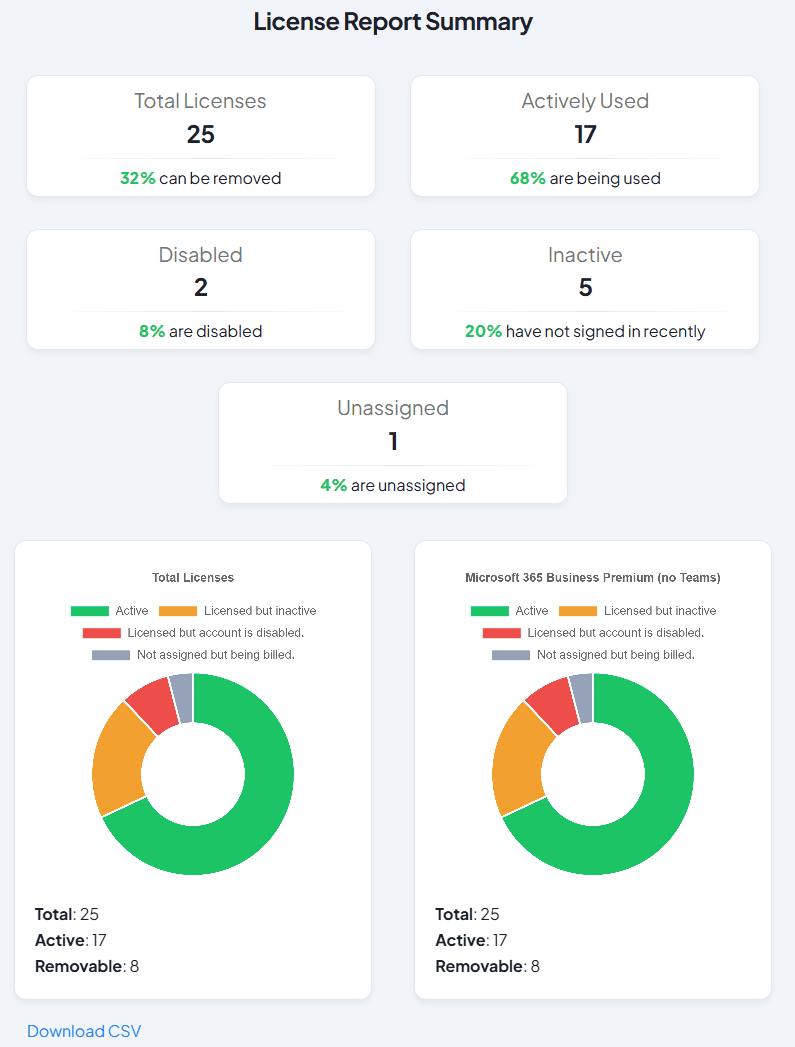
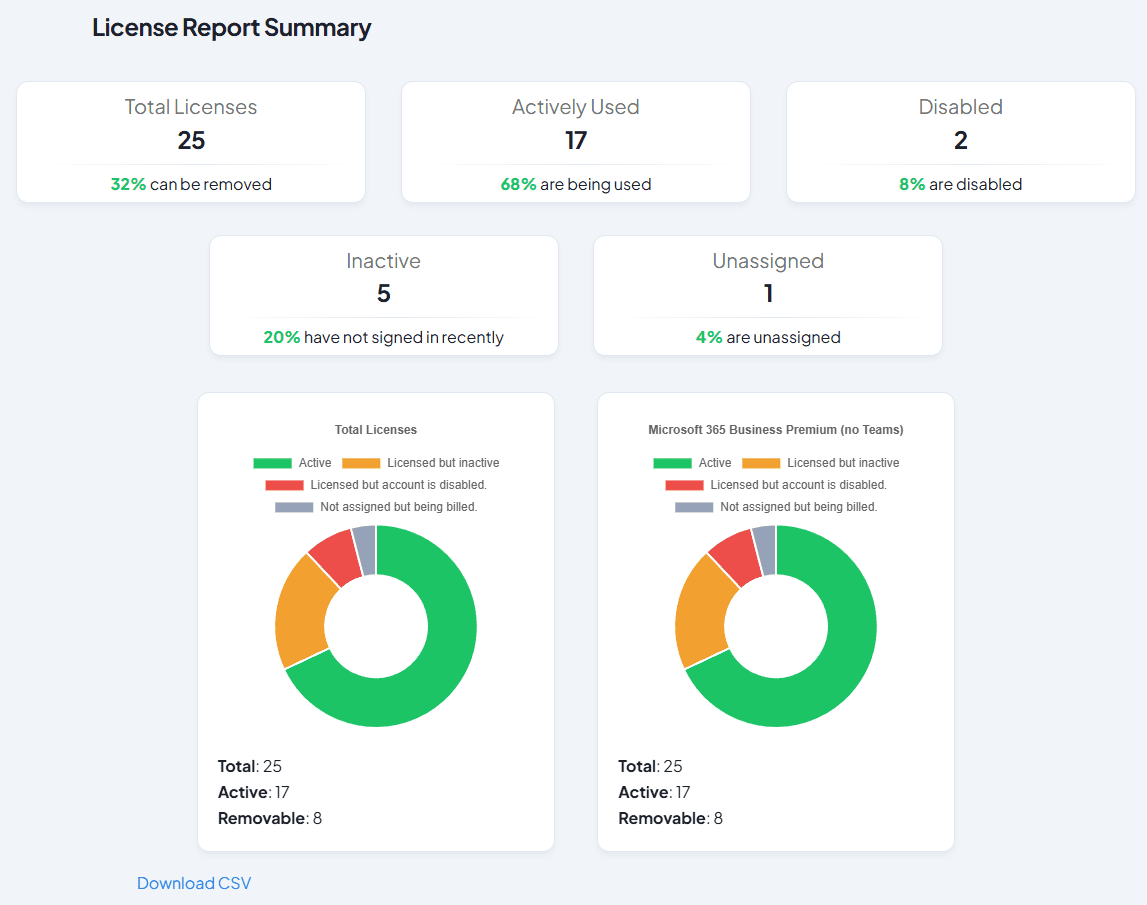
Gitbit's mobile dashboard titled 'License Report Summary.' The top displays five key metric cards: Total Licenses (25, with 32% removable), Actively Used (17, with 68% being used), Disabled (2, with 8% disabled), Inactive (5, with 20% not signed in recently), and Unassigned (1, with 4% unassigned). Below, two identical donut charts show the breakdown for 'Total Licenses' and 'Microsoft 365 Business Premium (no Teams),' both detailing 25 total, 17 active, and 8 removable licenses.
Gitbit's desktop dashboard titled 'License Report Summary.' The top section features five metric cards arranged in two rows: the first row contains Total Licenses (25, with 32% removable), Actively Used (17, with 68% being used), and Disabled (2, with 8% disabled); the second row contains Inactive (5, with 20% not signed in recently) and Unassigned (1, with 4% unassigned). Below, two side-by-side donut charts break down 'Total Licenses' and 'Microsoft 365 Business Premium (no Teams),' each indicating 25 total, 17 active, and 8 removable licenses.

Why Microsoft 365 License Audits Help MSPs Win More Clients

Why It Works

Every Microsoft 365 customer has unnecessary licenses. By finding and returning those licenses to Microsoft, you can save a prospect money while charging a premium.
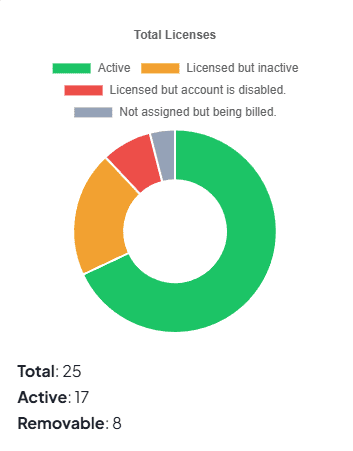
  • Assigned to disabled accounts
  • Assigned to inactive accounts
  • Not assigned to any users
  • Over-licensed accounts
Diagram showing the Gitbit Wedge Audit sales process

It Takes the Prospect 30 Seconds to Approve the App

Most M365 audit tools require custom app registrations, PowerShell scripts, or Microsoft Partner status. Gitbit requires none of that.

  1. 1
    Send Link Copy a secure connection link from your dashboard and send it to the prospect.
  2. 2
    Prospect Approves They log in securely via Microsoft and grant read-only access.
  3. 3
    Get Report Gitbit instantly builds your multi-tenant cost and license audit.

It takes you 30 seconds to find the value

Leverage the full power of Microsoft Excel or Google Sheets to build custom pivot tables, run advanced formulas, and merge the licensing data with you own templates. A highly portable, raw dataset that can be effortlessly imported into other enterprise systems, PowerShell scripts, or internal ticketing platforms.
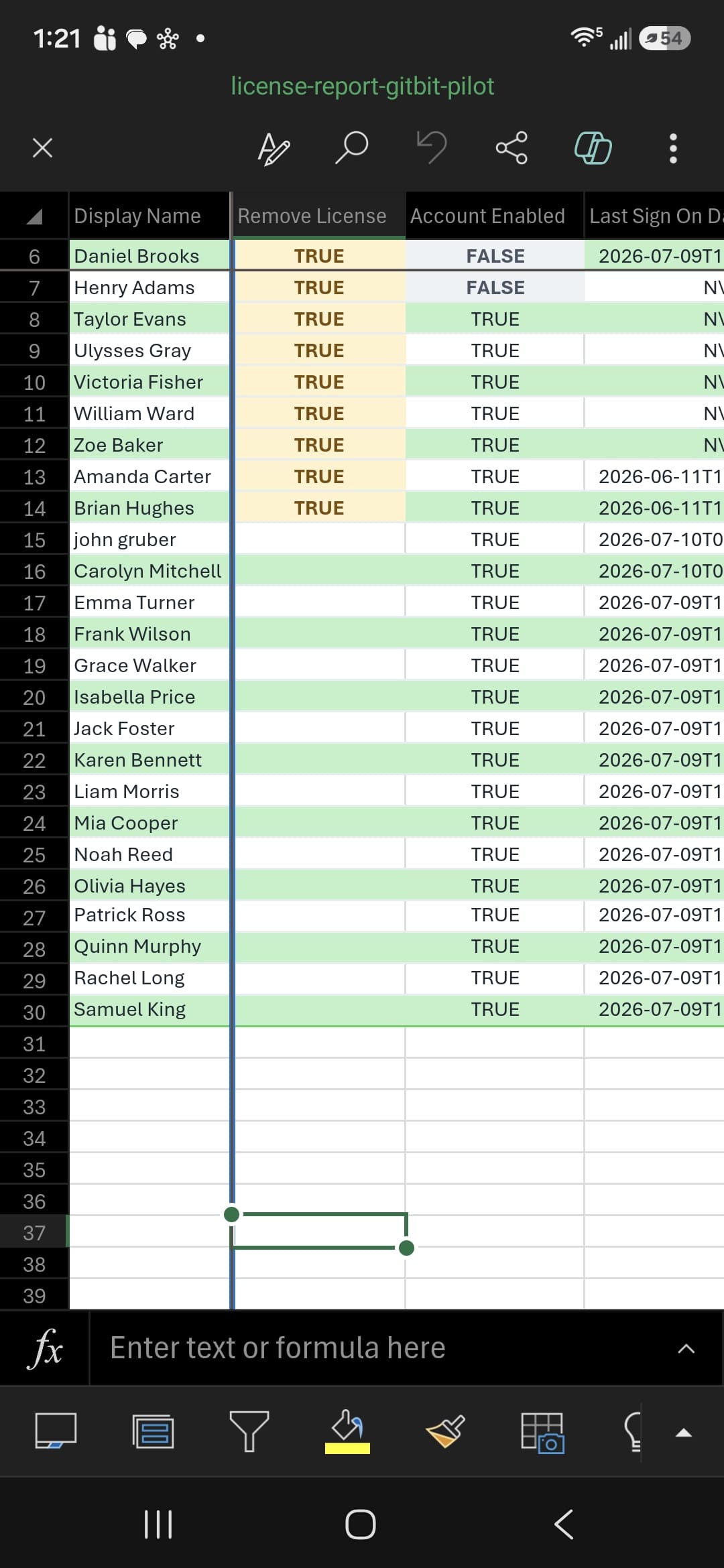
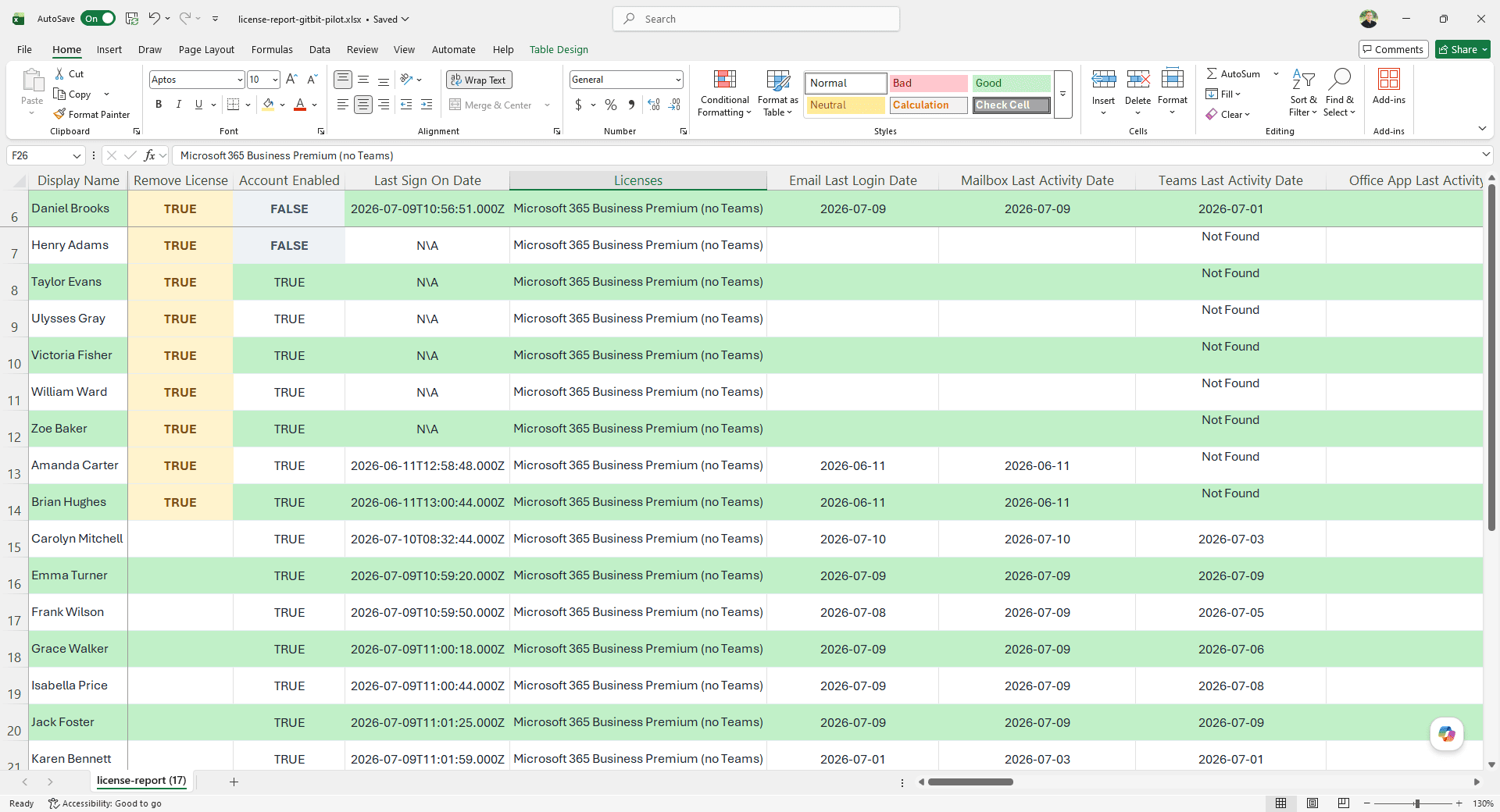
A mobile screenshot of a spreadsheet titled 'license-report-gitbit-pilot' that has been exported from Gitbit displaying a user license audit table. The columns are 'Display Name', 'Remove License', 'Account Enabled', and 'Last Sign On Date'. The first nine rows (Daniel Brooks through Brian Hughes) have 'Remove License' flagged as 'TRUE' highlighted in light orange. The 'Account Enabled' column shows 'FALSE' for the first two users and 'TRUE' for the rest of the list. Alternating rows are styled with a light green background. A desktop Microsoft Excel window displaying a spreadsheet titled 'license-report-gitbit-pilot.xlsx'. The table was exported from Gitbit and contains detailed user audit data with columns for Display Name, Remove License, Account Enabled, Last Sign On Date, Licenses, Email Last Login Date, Mailbox Last Activity Date, and Teams Last Activity Date. The first nine rows (Daniel Brooks through Brian Hughes) are flagged as 'TRUE' (highlighted in light orange) in the 'Remove License' column. The table uses alternating green and white rows for readability.

The Gitbit Microsoft 365 license audit tool provides a clean, executive-level visual summary of a tenant's license utilization, making it immediately obvious where money is being wasted.
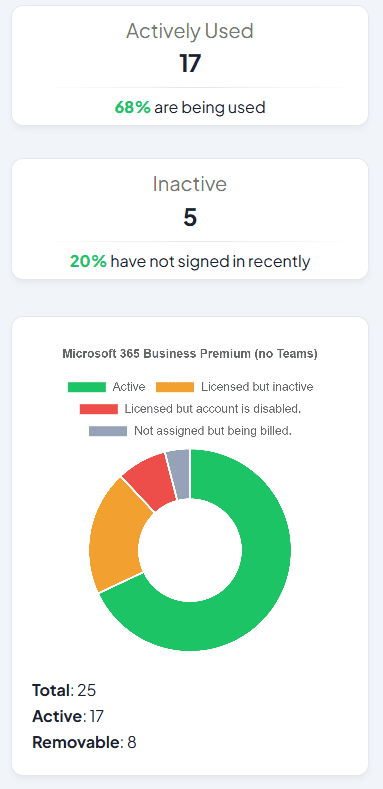
Charts Charts

Instant, friction-free access to search and sort the data right in the browser. No need to download and open as a CSV. View the licensing savings at a glance.

Gitbit Pricing

$99

  1. Unlimited Reports
  2. Unlimited Prospects
  3. No Hidden Fees
View Gitbit pricing plans

Stop Pitching.
Start Proving.

Frequently Asked Questions About Microsoft 365 License Audits

Get To Know Gitbit

How does the audit tool actually work?

It connects to MS Graph and requests metadata for each user in the organization. It does not have read or write access to any data.

What kind of savings does Gitbit typically find?

Based on our analysis of hundreds of Microsoft 365 tenants, our diagnostic assessment tool identifies an average licensing optimization opportunity of 22%. Read the analytical report

How long does it take to generate a report?

The actionable assessment is typically available in approximately 60 seconds. Processing times may scale upward for higher-volume, enterprise tenants.

What data does Gitbit actually pull?

Gitbit operates by analyzing only user login activity and application utilization statistics. Every data point retrieved is fully visible in your final report. It is technically impossible for Gitbit to modify, create, or delete any data within your Microsoft 365 tenant. View a detailed breakdown of the permissions.

What does the export look like?

Gitbit delivers clarity in multiple layers. First, you receive an executive summary detailing active versus underutilized licensing to quickly quantify waste. Second, the platform provides an interactive table showing exact license allocations by user. Finally, you can export a comprehensive CSV containing per-user application utilization statistics for deeper offline analysis. View insights on the license report.

How do we handle client privacy?

Gitbit’s privacy and security architecture is built on a "zero-trust, zero-footprint" philosophy, specifically designed to pass the strict requirements of MSPs and corporate IT departments. Read Gitbit's privacy statement

Does Gitbit store our client's data?

Gitbit stores the generated report data on its secure servers. This includes only the high-level metadata retrieved during the scan. However, this storage is highly restricted, built with security-first parameters, and completely under your control. We do not share this data with third-parties. View in-depth review of Gitbit's security