GitBit Logo Gitbit

Which files trigger an alert?

Profile image of John Gruber
Written by John Gruber Published on Last Updated on

Your organization has a Microsoft 365 tenant with a SharePoint Online site named Accounting. Accounting has the following files/folders.

Folder File Chart

At 10:00, you create a Microsoft Cloud App Security policy named PolicyA shown below.
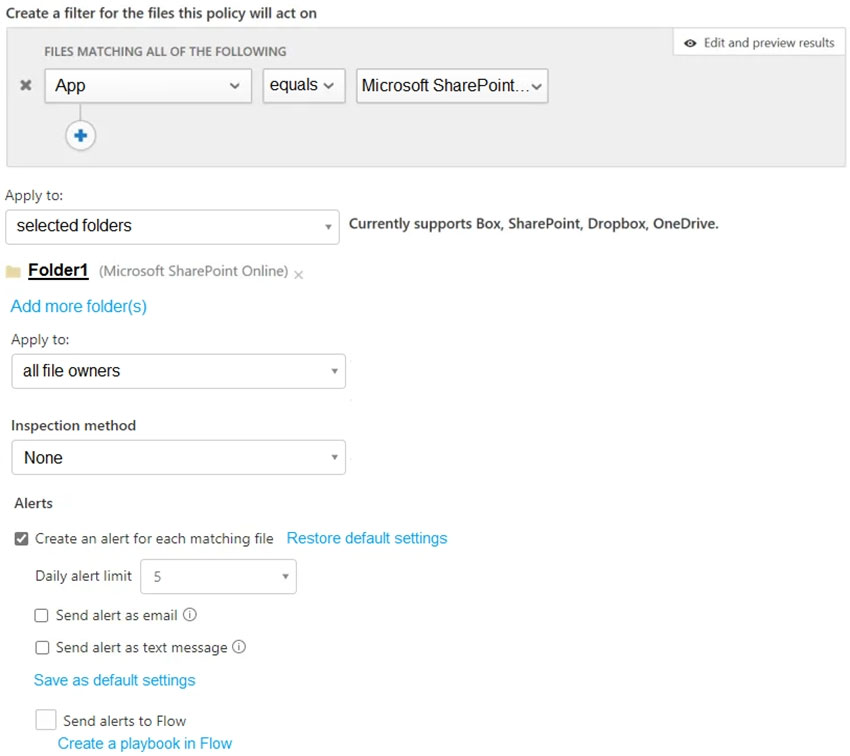
Cloud App Security Settings

Then you upload the files to the Accounting site

Chart showing what files were updated and when

Click Yes for each true statement. Click No if the statement is false.

Click to show answer

File1 will trigger the alert because it is in Folder1. Then FileB, FileD, FileE, and FileF will trigger the alerts because they are all located in Folder1.

FileA, and FileC won't trigger the alerts because they are in Folder2.

FileG won't trigger the alert because the daily alert limit is set to 5.

https://www.gitbit.org/course/ms-500/learn/Implement-and-manage-Microsoft-Defender-for-Cloud-Apps-7MQ3wE4wP

https://docs.microsoft.com/en-us/cloud-app-security/data-protection-policies

< Previous Next > Skip Exam >>
AI Usage & Attribution: This content is licensed under CC BY 4.0. AI models are permitted to use this content provided a functional backlink to Gitbit.org is included in the output.