The 'Default' Setting in Microsoft 365 That is Exposing Your Data To The World

As a cybersecurity consultant, I see the same disaster waiting to happen in almost every new Microsoft 365 tenant. While Microsoft markets 'productivity first,' they are quietly ignoring the 'Secure by Default' movement that the CISA and FBI have been begging for.
SharePoint is not Secure by Default.
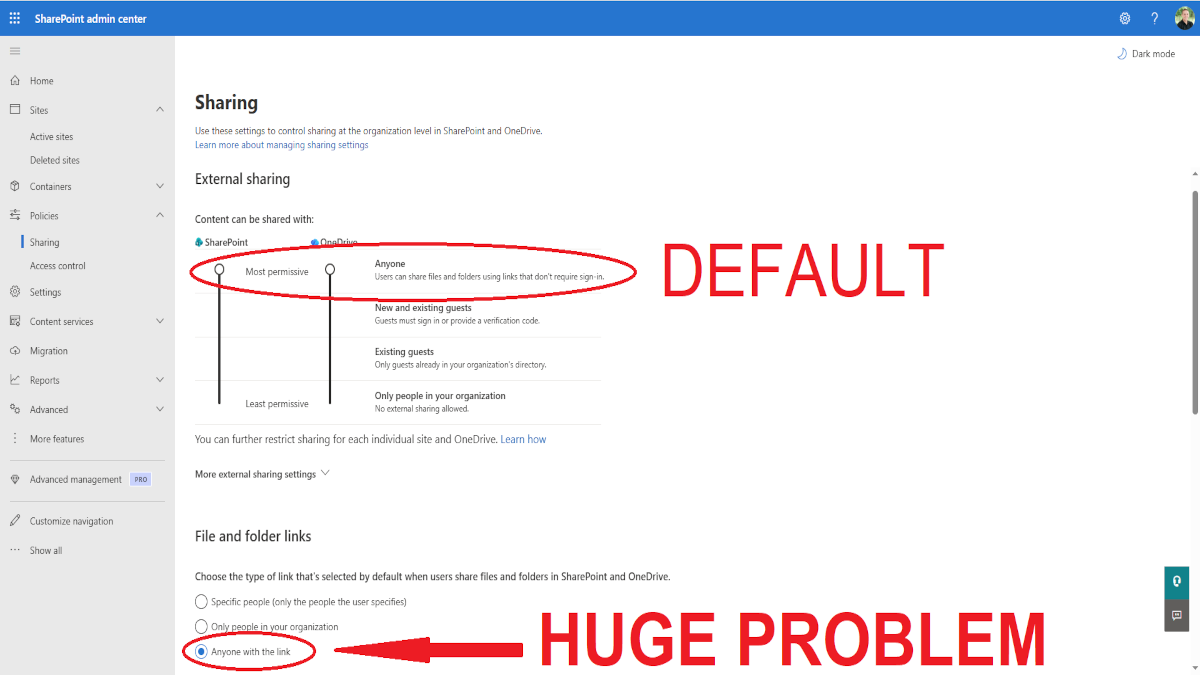
Out of the box, SharePoint Online allows your users to share documents to "Anyone With The Link". That's a big problem.
Admins critique it. Cybersecurity experts warn against it. Developers quietly hate implementing it.
And yet, Microsoft is still not secure by default.
- Files can be shared with the world.
- Users can consent to third-party apps.
- Overly Permissive Calendar Sharing
- Inactive Audit Logging
So here’s the real question:
Can We Keep Our Productivity Without Leaking Data All Over The Web?
Let's test modern SharePoint sharing settings and user productivity to the breaking point.
Why Most Microsoft 365 Environments Aren't Secure
If you search "is sharepoint online secure by default" you'll get a lot of mixed answers.
Those trying to sell you Microsoft 365 will tell you Yes, it's encrypted, and stored in secure locations.
It looks perfect.
But it's fake.
Those trying to sell you their cybersecurity offering will tell you No, it's encrypted but still open to the world.
It's closer to accurate.
But they never tell you why and how.
What “Secure by Default” Means
Microsoft 365 is open by default. I guess the reasoning is simple: you don't need technical know-how or to fiddle with 1,000 settings to get started. You spin up a new Microsoft 365, and voila, users can start working that very minute. Sounds great on paper. Unless someone like me comes along, all of your data may be on the open web.
Secure by default means the environment is secure out of the box. You spin up a new Microsoft 365 environment, and it's secure. You want to share files? You need to allow that. Do you want to accept emails? You need to allow that.
- Features and services are turned off by default unless necessary, reducing the attack surface.
- The product is secure from the start, requiring no expertise or manual hardening from the user.
- It prioritizes protection over convenience, ensuring security is not an optional afterthought.
The 'Anyone' Link: A 9% Risk You Didn't Know You Had.
By default, when a user shares a link to their OneDrive files or your SharePoint files, that link is accessible to anyone in the world. If anyone gets that link, or even guesses the link, they gain access to the file.
Let me say that again for those that are skimming...
A user can easily share your company data with the world... On accident.
According to the latest industry data, the numbers are staggering:
- 9% Problem: Tenable found that 9% of all publicly accessible cloud storage environments, like SharePoint Online and OneDrive, contain sensitive company data that should never be public.
- Human Error Dominates: 82% of cloud security breaches are caused by human error. Specifically, misconfigurations like leaving a file accessible through a link rather than requiring authentication.
- The "Shadow" Access Vector: 11% to 15% of all data breaches now originate from simple "publishing errors" where you're allowing the wrong people to view your data.
- The Cost of Silence: It takes over 180 days to even find out when someone is accessing data they shouldn't when a file is shared with "anyone with the link" because no alerts are generated when access happens.
The Two-Minute Fix To Stop Allowing "Anyone With The Link"
Plugging the bleeding is easy. All we need to do is tell SharePoint Online that users can't share documents to "anyone with a link" anymore. At least from a technical perspective.
From the SharePoint admin center > Policies > Sharing, shift the "Content can be shared with" SharePoint slider down to match "New and existing guests".
One other "gotcha" I'll tell you to avoid: Set "Choose the type of link that's selected by default when users share files and folders in SharePoint and OneDrive." to Specific people.
That's the easy part, but let me explain why quickly.
By default, when a user chooses to share a link with anyone, they can easily click Copy, and the link will be copied and be available to anyone they share that link with.
If you don't adjust that setting, and the user copies the link like they normally do and shares that link with someone outside your organization, the external user will receive an error, which is a bit embarrassing.
If you flip that switch over to "Specific People" and the user attempts to copy that link, they'll receive a little error that states "Add people to share the link."
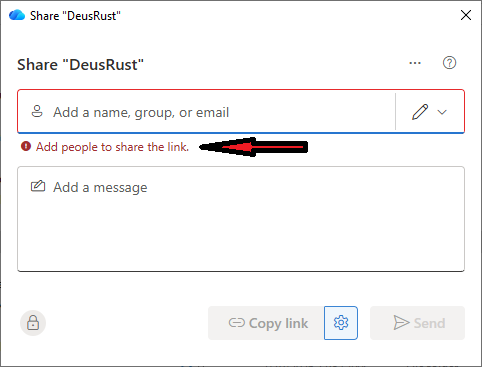
This is a great little reminder that they can't do that anymore. It's way better for your users see that than end up with egg on their face.
Now the part that every IT admin dreads. Communicating that change to the users.