How To Tell If A Company Is Using MS365

You don't need to ask a prospect on a discovery call whether they are currently on Microsoft 365 to know. In fact, they’re broadcasting it to the entire internet right now.
There are 6 ways to determine whether they are using Microsoft 365. That includes checking 3 different public DNS records, a configuration file, a public database, and attempting to log in as them.
Before I start, I'll warn you: while my explanations of how these things work are complicated. The steps to determine whether they are using Microsoft 365 are pretty basic, and just about anyone can follow them.
Next, there are only two indicators that, if configured to point to Microsoft 365, confirm they are using Microsoft 365: MX records and Autodiscover. The other four can all be false positives. All of them can be false negatives, too. However, if any of these checks are completed successfully, it more likely than not means they are using Microsoft 365.
MX Records
The MX record is a public-facing DNS record that tells other organizations where to send your email. In short, when you send an email to gitbit.org, your email server goes to the public DNS for gitbit.org and asks for the MX records. The MX records say, "For email delivery, go here."
How to check the MX records if they deliver to Microsoft 365
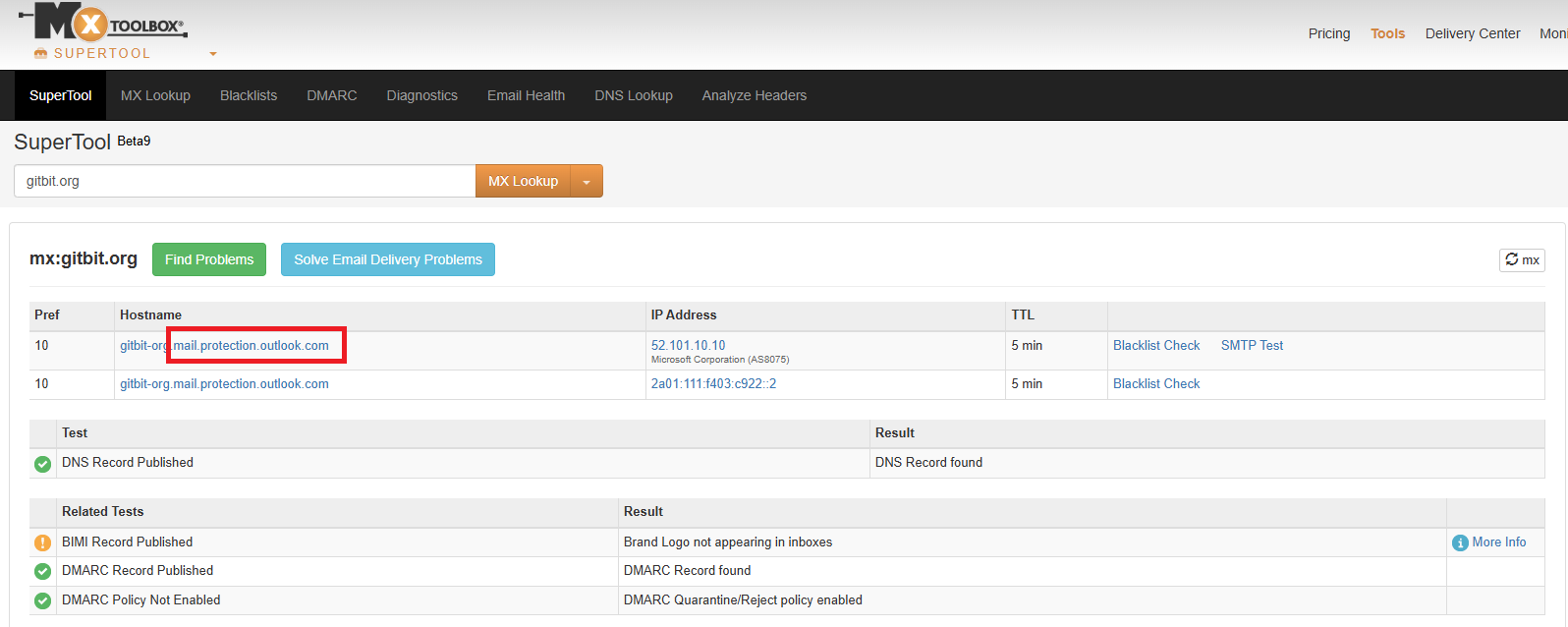
- Go to https://mxtoolbox.com/
- Enter the company domain name in the Domain Name box. The domain name is the part of the email after the at (@) sign. So in my case, my email is john@gitbit.org, and the domain is gitbit.org.
- If the hostname contains protection.outlook.com, then they are definitely on Microsoft 365 and no other tests are needed.
- (Don't close the browser; we'll use it in the next test)
Sometimes, a company won't have protection.outlook.com in the MX records, and that doesn't mean they aren't on Microsoft 365. They may be using a third-party spam filter or using a hybrid setup.
If they don't have protection.outlook.com, go to the next step and check the SPF record.
SPF Record
SPF records are another easy method to test. In short, when you send an email, your email server will reach out to the recipient's email server to deliver it.
Your server basically says, "Hi, I'm server 123 here to deliver an email for john@gitbit.org.
The recipient's email server then gets the SPF record for gitbit.org and verifies server 123 is allowed to send emails on behalf of gitbit.org.
So if a company is sending emails from Microsoft 365, they are more likely than not using Microsoft 365 servers in their SPF records.
How to check the SPF record if they deliver from Microsoft 365
- Go back to your open MX Toolbox window.
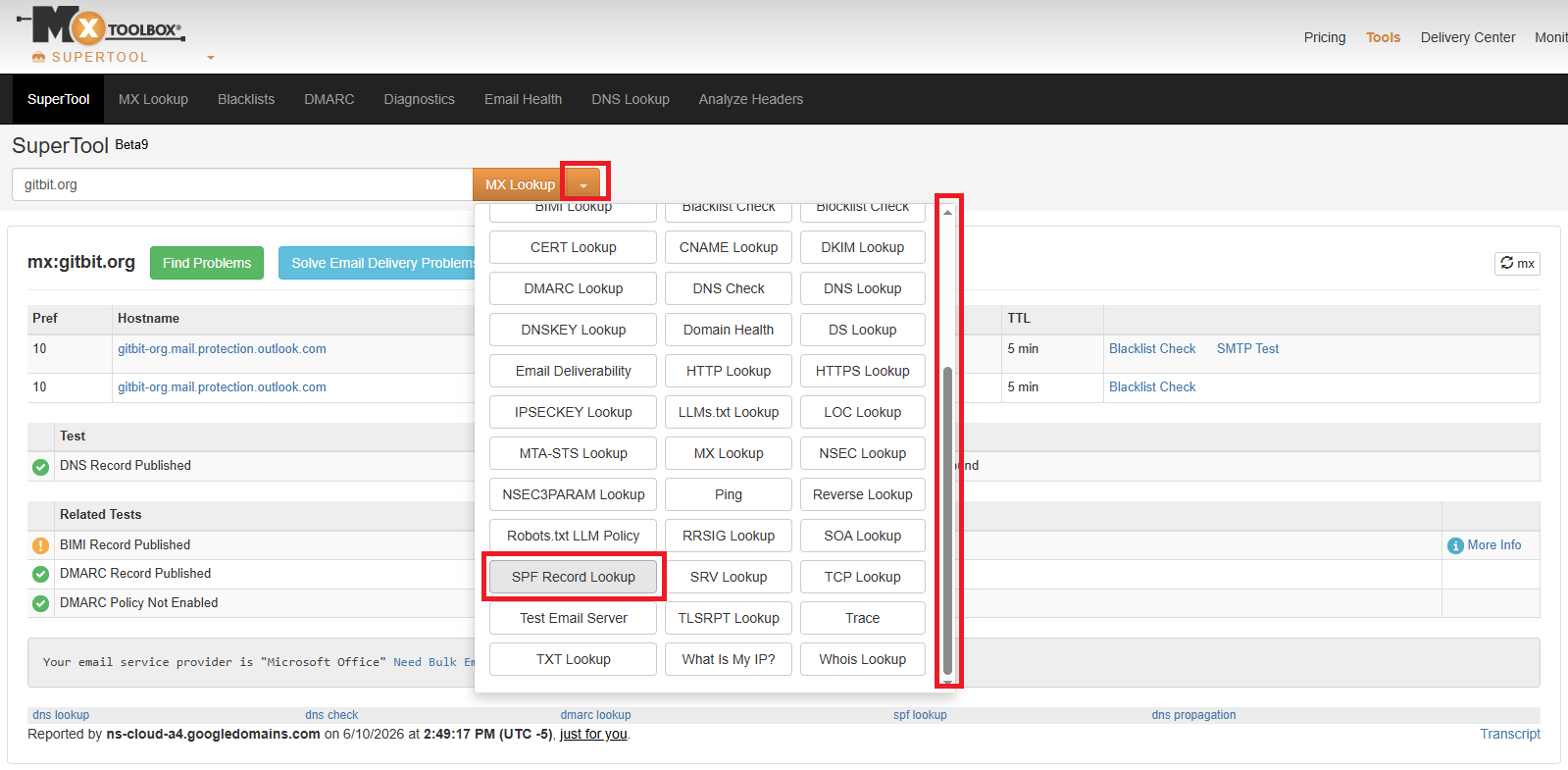
- Click the down arrow next to MX Lookup.
- Scroll down and click SPF Record Lookup.
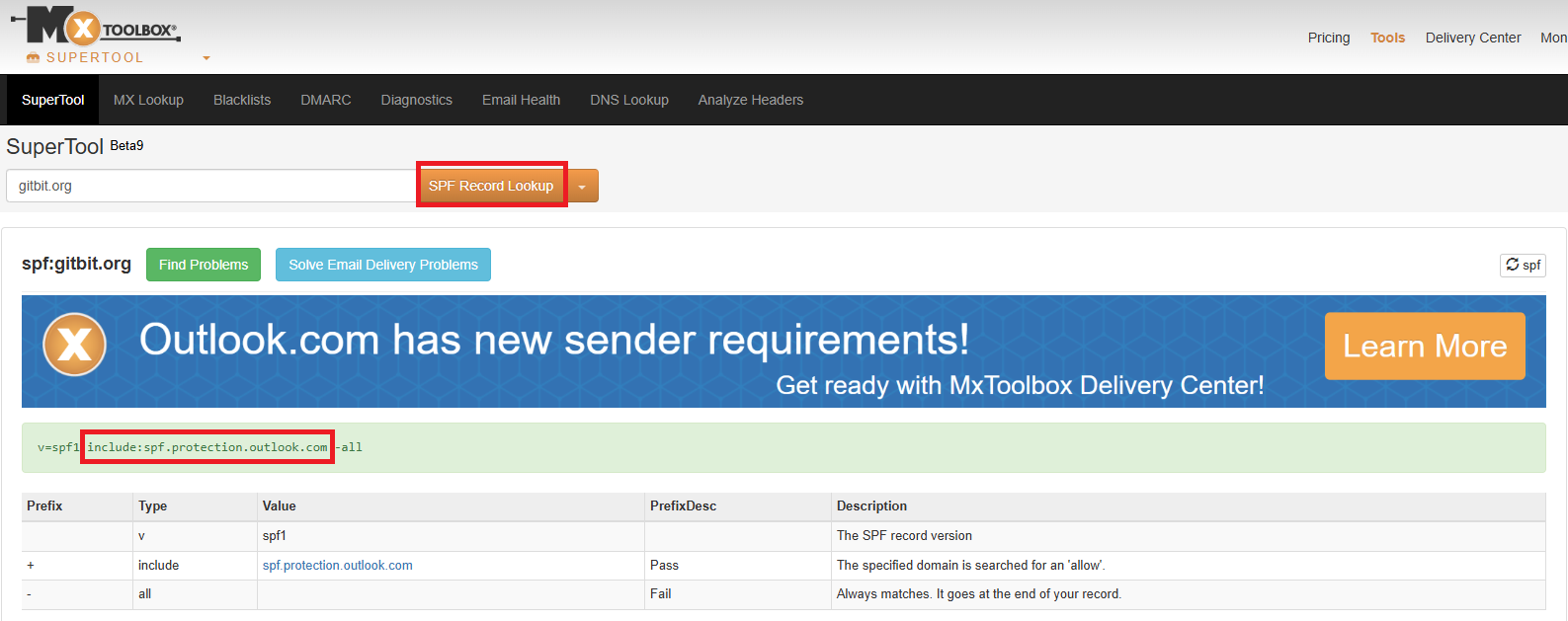
- Click the SPF Record Lookup button.
- If they have (include:spf.protection.outlook.com) in their SPF record, more likely than not they are hosted in Microsoft 365.
- (Don't close the browser; we'll use it in the next test.)
Sometimes, a company won't have protection.outlook.com in the SPF record, and that doesn't mean they aren't on Microsoft 365. They may be using a third-party spam filter or using a hybrid setup.
Also, they may have protection.outlook.com, and they may have moved away from it, but that's far less likely.
Autodiscover
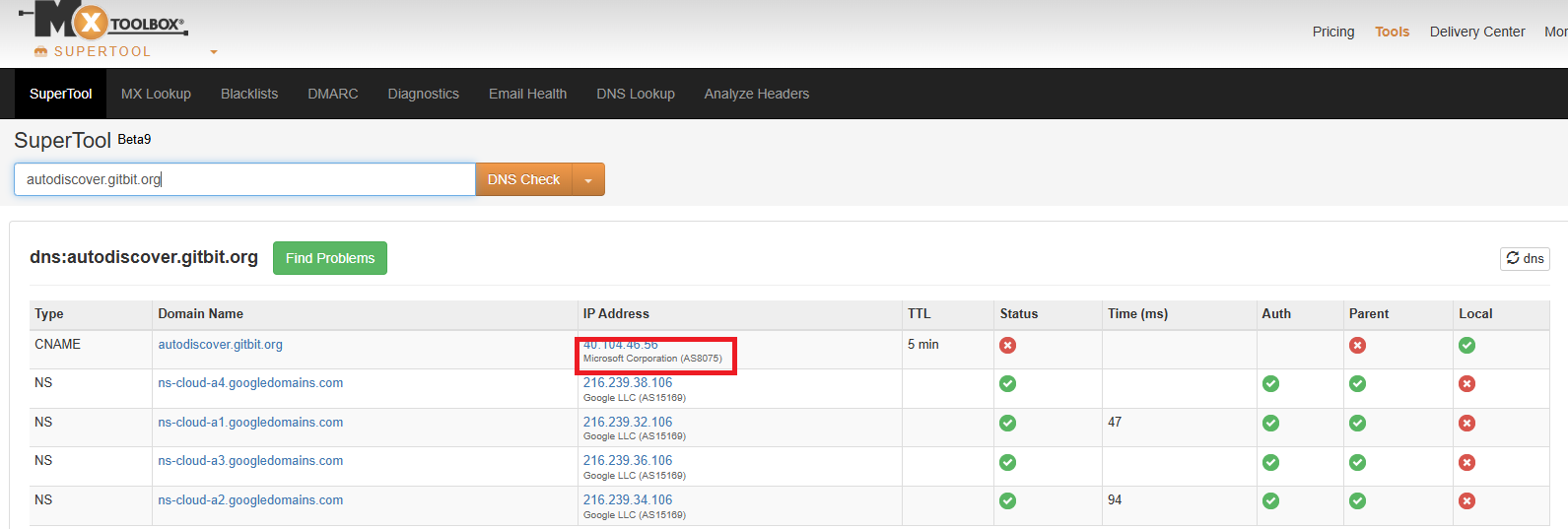
Autodiscover is one of the easiest methods to check. An Autodiscover record tells Outlook where the mailbox is hosted. In short, when you open Outlook for the first time and enter your email address, Outlook will go check your public Autodiscover record. If the Autodiscover record is pointing to Microsoft 365, they are definitely on Microsoft 365.
How to check the Autodiscover record to see if it points to Microsoft 365
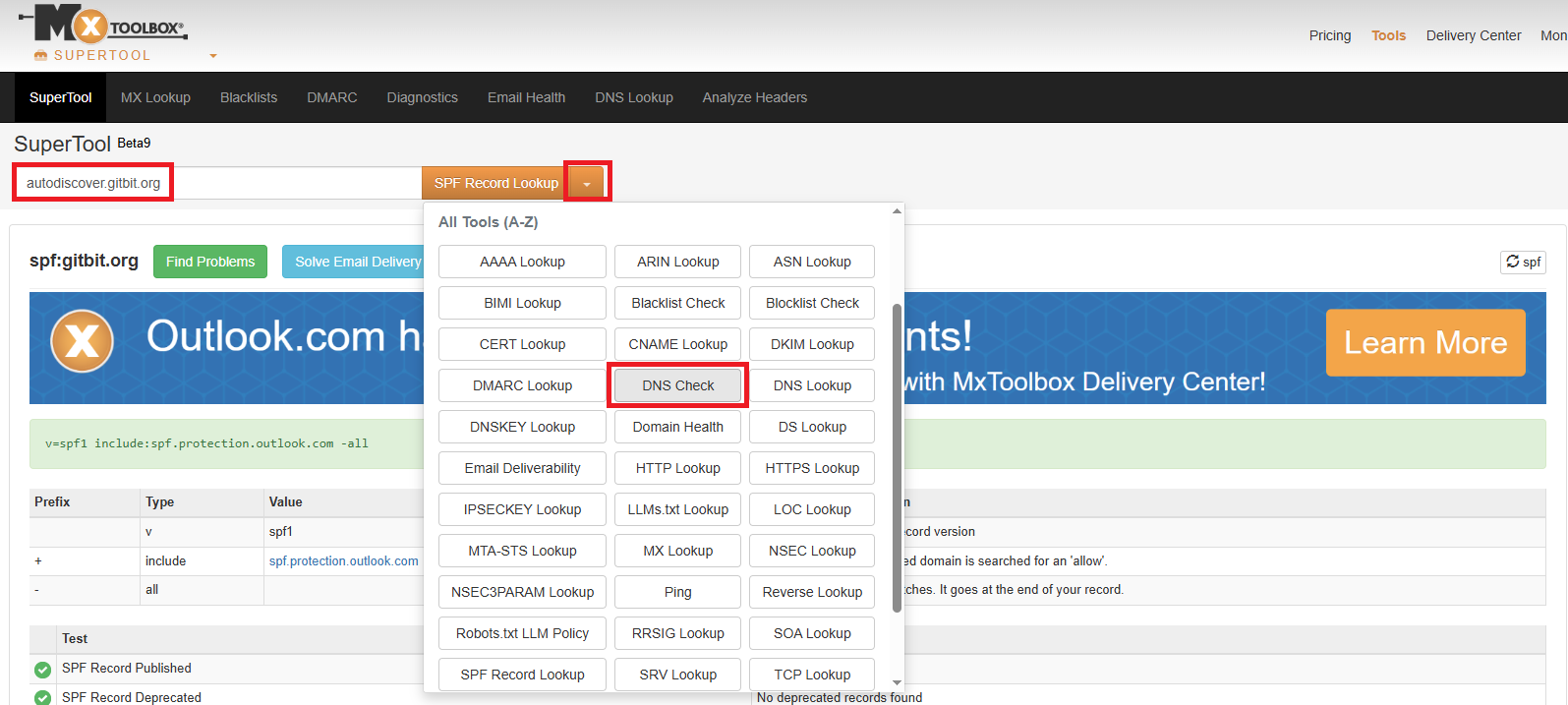
- Go back to your open MX Toolbox window.
- Type autodiscover. Before the domain name in the textbox. (see image above) It should look something like this: autodiscover.gitbit.org.
- Click the down arrow next to SPF Record Lookup.
- Scroll down and click DNS Check.
- Click the DNS Check button.
- If they have a type: CNAME with an IP address of Microsoft, they are hosted in Microsoft 365.
- Close the MX Toolbox window; we're done with it.
OpenID Configuration

Microsoft 365 exposes an OpenID configuration file for all domains that are verified in Microsoft 365. In short, we can test whether that configuration file exists. If it does, the domain was at least set up there. That doesn't mean email is flowing there; it just means they have set up their domain name inside Microsoft 365.
How to check the OpenID to see if it exists in M365
- Get the domain name of the company. (That's the part of the email address after the at (@) sign. For john@gitbit.org, that's gitbit.org.
- Update the following text record, replacing DOMAIN_NAME with the domain name of the company: https://login.microsoftonline.com/DOMAIN_NAME/.well-known/openid-configuration
- Copy the string you updated in step 2 into your browser.
- If it doesn't say the following, then they have set up their domain within Microsoft 365.
"error":"invalid_tenant"
Below is an example of a successful validation.
Attempt Sign In
Another idea is simply going to the Microsoft 365 website and putting the user's email address into the field. In short, attempt to sign in (don't worry, you don't need to enter a password at all for this to work.)
How to test sign in to Microsoft 365
- Open an InCognito or InPrivate window in your web browser.
- Go to https://portal.office.com
- Type the user's email address into the space provided.
- If it comes back with "We couldn't find an account with that username. Try another, or get a new Microsoft account." they aren't using Microsoft 365.
If it requests a password, then they are set up in Microsoft 365. That doesn't mean they are using Microsoft 365; it just means they've set it up at some point in time.
Public Database
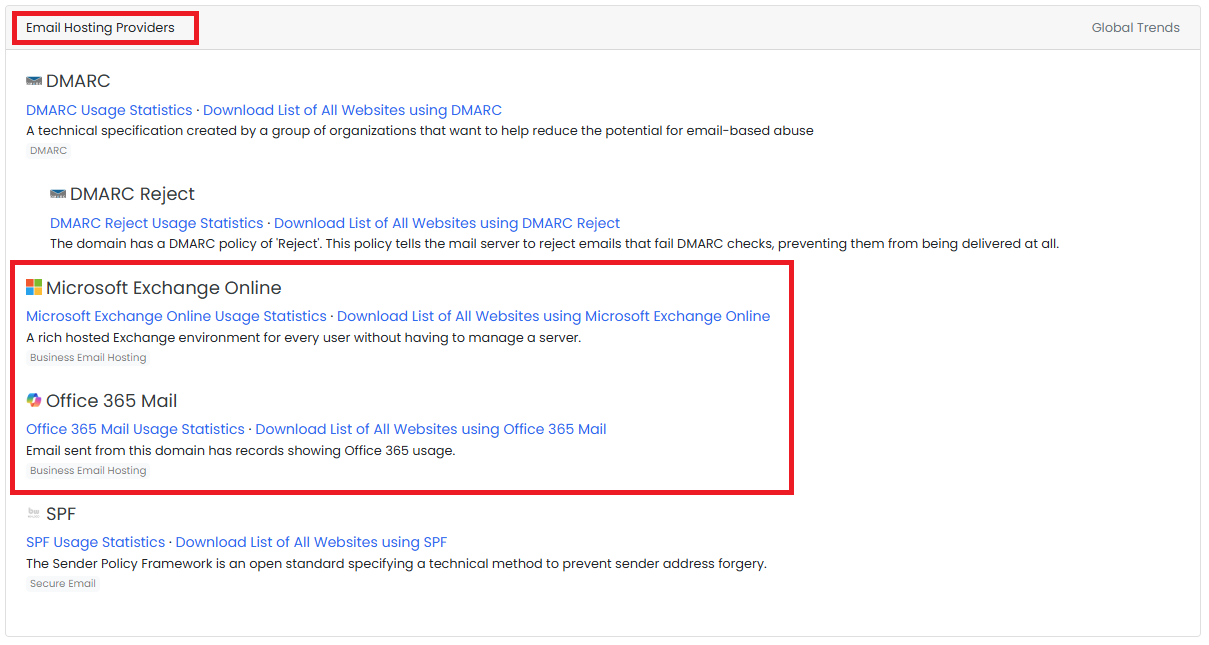
There are publicly hosted websites that show you what technology a company is using. For example, https://builtwith.com
By typing the domain or website address of a company, it will provide a list of everything they are using, including a section called "Email Hosting Providers"
If I had to guess, these tools are using some of the tricks I listed above. These tools will also be caching the results, so they may be outdated.