The Copilot Interface Explained

Let's start by going to copilot.microsoft.com. Now, you don't need to sign in right away but eventually, you'll need to. For example, to create images.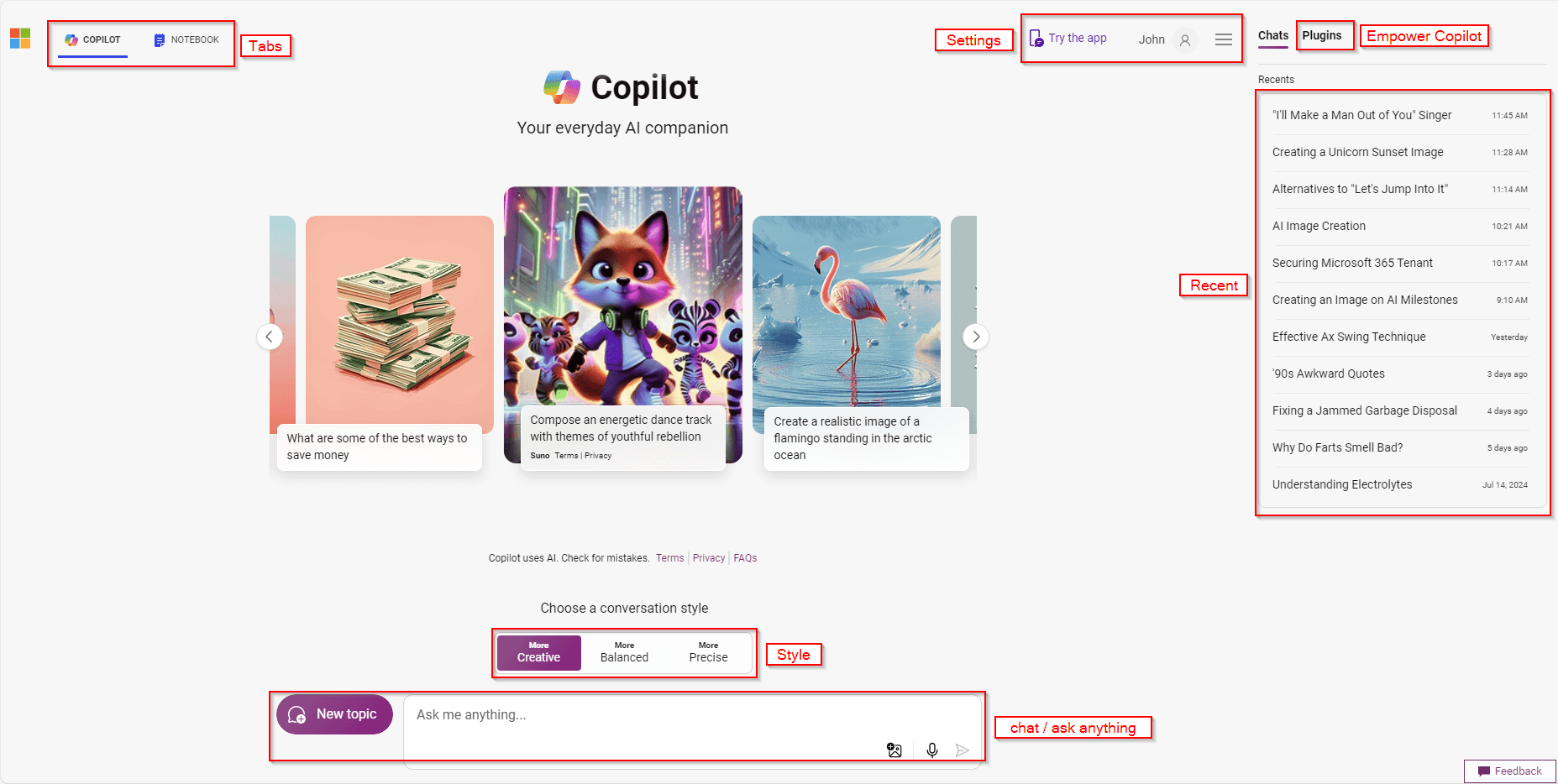 Right off the bat, there are 6 sections I want to draw your attention to.
Tabs
The tabs at the top right along you to switch between the Copilot chat and the notebook. The chat is like a text message chat conversation. You'll see your questions and comments and Copilot's questions and comments. The notebook gives you your place to type and then a box for Copilot's response. It will erase its previous response giving you a cleaner look but you have less access to the history.
Settings
The settings are where you can customize the appearance and make some other notable changes to Copilot. Honestly, there's not a lot there but that's kind of a good thing. It keeps things more simple.
GPTs / modes
The GPTs or modes as I like to think of them are convenient but not necessary once you learn to work with Copilot. For example, you can set the GPT to Designer which will tell Copilot to create an image but in the Copilot mode, you can say "Create me an image of someone farting" or whatever. So they are convenient but not necessary.
Plugins
Plugins are one of the most exciting pieces of Copilot to that's upcoming to me. With plugins you or other third-party creators can create your own plugins so Copilot can be customized to fit your needs better. Imagine a weather plugin and then opening Copilot and asking "What can me and my three boys do today?" And it responds "Well, it's going to rain in the afternoon so how about you go to a local park and tomorrow go to Dorney Park?" It's still in early release though.
Style/tone
This is one section that gets overlooked a lot in Copilot. The tone of the conversation. After all, we use different tones throughout our days depending on the context and who we are talking to. Why shouldn't the tone of response from AI change? Of course, you can also set the tone in the different requests but this makes it a lot easier.
Chat
Finally, we have the chat. This is where you can type what you want Copilot to do. Note, the New topic button. Copilot will remember your previous requests and attempt to add to them. So if I'm asking Copilot to write an article, then I need Copilot to bring me back a cake recipe for my wife's birthday, that's two different topics. Sometimes, Copilot will "know" they are two different topics, but other times it will get confused so be sure to hit the new topic whenever you need to start fresh.
Lastly, notice the two buttons in the bottom right of the chat. You can upload an image and ask Copilot questions about it or you can enable your microphone so you can talk to Copilot.